01Attract
Give your coaching business a front door
Build a responsive coaching website, focused funnel or Link in Bio, then give the right visitor a clear route to apply or book.
- Website and funnel builder
- Link in Bio
- Applications and forms

Personal trainer & online coaching software
CoachOS is personal trainer software for independent coaches and coaching teams: build the front door, manage leads and bookings, deliver workouts and nutrition, communicate through the client app and adapt with the right context.
Not another flat feature list
The useful unit is the handoff: what the coach already knows when a visitor becomes a lead, a lead becomes a client, and a client needs the plan to change.
Build a responsive coaching website, focused funnel or Link in Bio, then give the right visitor a clear route to apply or book.
Bring form and booking context into a staged lead pipeline, then manage the offer, supported Stripe payment and move into onboarding.

Build workouts and nutrition, review check-ins and progress, and keep messages beside the client record that gives them meaning.

Use check-ins, supported client-granted health context and Smart Rest Days to inform a decision that remains with the coach.

Two views of the same work
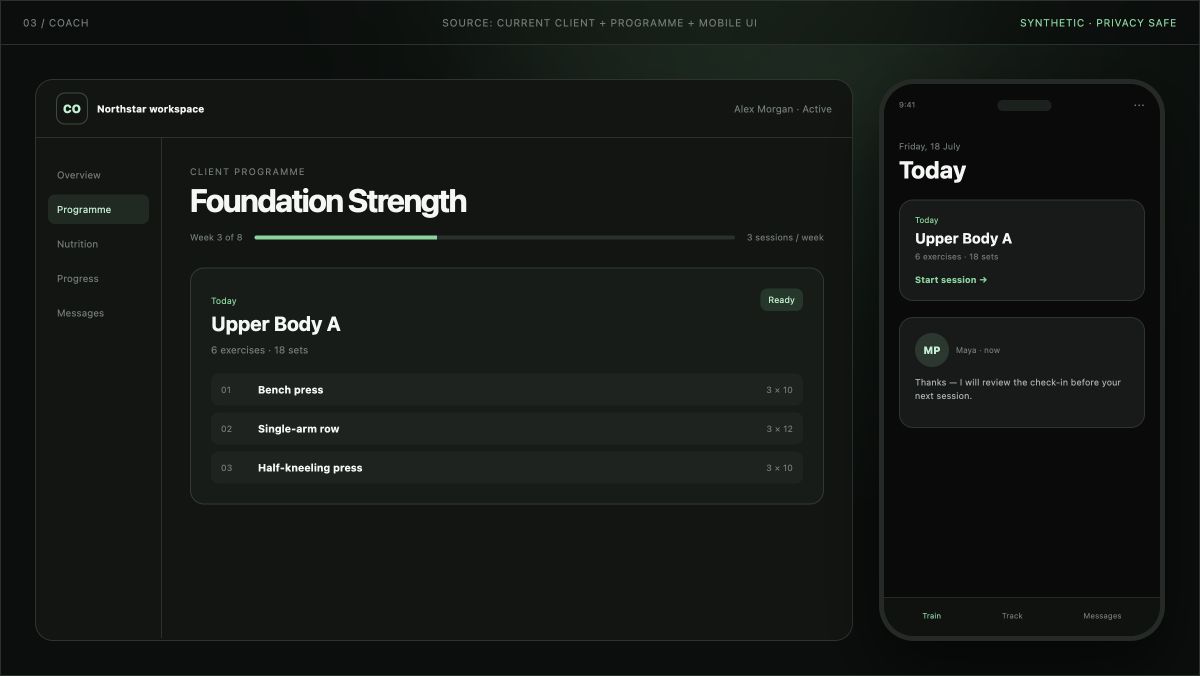
CoachOS does not squeeze the admin workspace onto a phone. Coaches use the web workspace to plan and review; clients use the mobile app for the work between check-ins.
Manage leads, bookings, offers, client records, programming, nutrition, progress, check-ins and messages from the coaching workspace.
Explore the coaching workspace →Open the current workout or nutrition plan, log progress, check the schedule, send a message and share supported health context with permission.
Explore the client app →Switch without pretending it is one click
Moving platforms is a data and client-experience change. CoachOS can help plan eligible migration work, but not every historical field or external tool can be imported automatically.
List where your website, enquiries, bookings, payments, programmes, nutrition, progress and messages live today.
Define the clients, content and supported records to bring across, who owns each step and which history should remain in its source system.
Check access, programming, payments, notifications and the client app with representative accounts before inviting the wider roster.
Move the next useful handoff, keep a dated fallback and retire the old tool only after the new journey has been checked.
Before you choose
Capabilities matter, but so do ownership, device support, limits and the exact status of every external dependency.
You retain ownership of the programmes, meal plans, messages, photos and other content you add. You can request a copy before deleting an account.
Review security and data handling →Clients can train, log nutrition, follow schedules, share progress and message their coach. Supported offline actions synchronise when connectivity returns; not every feature works fully offline.
See the client experience →Stripe, Apple Health and Health Connect are live. Other connections have explicit limited, review-stage, configured-account or planned labels instead of a generic logo wall.
Check current integration status →Pay as you go: £6/active client/month, £0 base subscription; Starter: £49/month, up to 10 active clients; Growth: £99/month, up to 30 active clients; Pro: £149/month, up to 50 active clients; Team: £198/month, up to 500 active clients. 0.5% platform fee on payments through CoachOS.
See every price and limit →All-in-one, with a clear boundary
Questions, answered
Personal trainer software gives a coach one place to organise client delivery, communication and progress. CoachOS also connects the earlier business journey: the public website, applications, bookings, lead pipeline, offers and onboarding.
Yes. CoachOS supports online delivery through the client app and can organise programming, nutrition, progress and communication for coaches who also meet clients in person. It is not a venue, access-control or gym membership system.
The CoachOS client app is available on iOS and Android for supported devices. Clients can follow workouts and nutrition, view schedules and recipes, log progress, exchange messages and share supported health data with permission.
Yes. Existing clients and eligible data can be moved in stages. The CoachOS team can help define what is eligible, who handles each step and when to switch; not every historical field or external tool can be imported automatically.
CoachOS includes a coaching website and funnel builder, Link in Bio, forms, public bookings and a connected lead pipeline. It can replace that core coaching workflow, but it does not claim every advanced feature of a general-purpose website platform, CRM or automation suite.
Yes. You can move the parts that create the most handoffs first and keep supported external tools where they still add value. The integrations page shows what is live and what is limited, in review or planned.
Pay as you go: £6/active client/month, £0 base subscription; Starter: £49/month, up to 10 active clients; Growth: £99/month, up to 30 active clients; Pro: £149/month, up to 50 active clients; Team: £198/month, up to 500 active clients. 0.5% platform fee on payments through CoachOS. Checkout shows the current trial duration and renewal terms.
No. CoachOS AI can help draft and analyse work for a coach to review. The coach remains responsible for what is assigned or communicated, and health context is not presented as a medical diagnosis.
See your workflow in CoachOS
Start with a free trial, or bring your current stack and client journey to a walkthrough with the CoachOS team.