01 / Standard website
Tell the complete story
Build a clear home for your offer, approach, results and next step. Use a theme that fits your coaching brand rather than starting from an empty page.
Website & Funnel
CoachOS gives online coaches a website, focused funnel, Link in Bio, forms and booking journey that feed the same lead pipeline. Your public pages are not another disconnected tool.

One brand, different journeys
A warm Instagram follower and a search visitor do not always need the same page. Give each one a direct path without managing three different builders.
Build a clear home for your offer, approach, results and next step. Use a theme that fits your coaching brand rather than starting from an empty page.
Lead with video, keep the page focused and guide the right visitor towards an application or booking.
Give Instagram visitors a branded route to apply, book, view proof or move to the page that matters next.
The connected workflow
CoachOS keeps the journey moving after a visitor raises their hand. The lead, booking and next action stay visible in the same workspace.
Choose a standard coaching website, a video-first funnel or both. Add a focused Link in Bio for social traffic.
Use CoachOS forms and applications to collect the details your sales conversation actually needs.
Set availability and give qualified leads a public booking page with a clear next step.
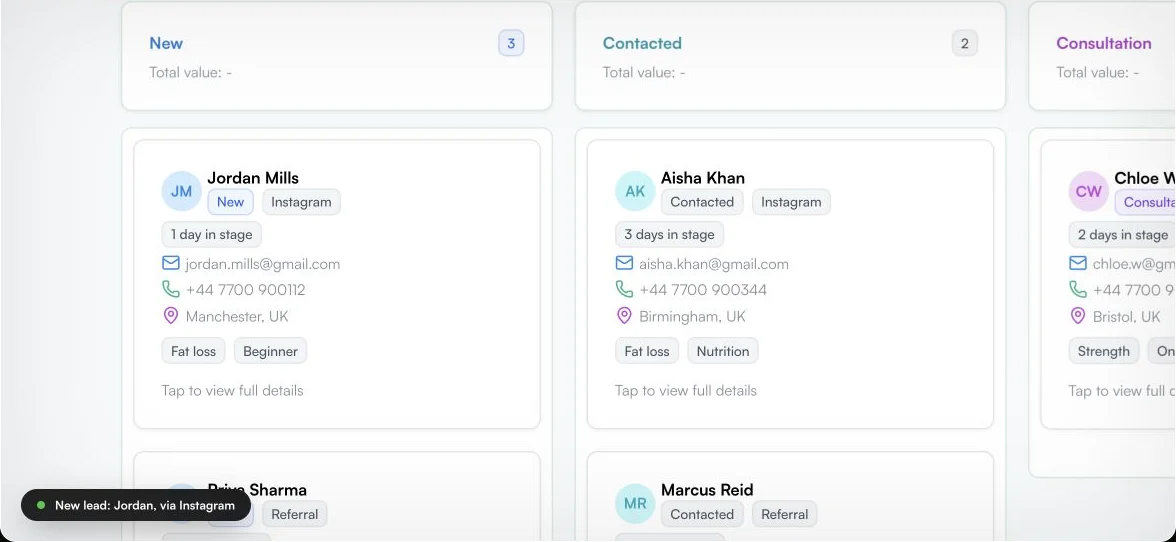
The new lead enters the Sales Pipeline where notes, stage and follow-up stay visible.
See website and funnel activity in CoachOS, including visits, form submissions and booking progress.
Your site, under your control
Set the visual direction, content and page structure for your coaching brand.
Start on a CoachOS subdomain, then connect an active custom domain when you are ready.
Review visitors, form activity, bookings and conversion stages without moving data into a separate report.
Move the enquiry into a clear stage, keep notes close and make the next action obvious.
Fewer handoffs
General website builders can publish a page. CoachOS connects that page to the forms, bookings and lead workflow built for a coaching business.
Questions, answered
Yes. Coaches can choose a standard coaching site, a video-first VSL funnel or use both for different visitor journeys.
Yes. Link in Bio is part of the Website & Funnel workspace, so your social profile can point to applications, bookings, proof and other useful pages under the same brand.
Yes. CoachOS supports publishing to a custom domain. A default subdomain is also available while your custom domain is being connected.
The enquiry can create a lead in CoachOS, keeping the submitted information and source connected to your lead management workflow.
The current public booking flow is designed to schedule the call. No payment is collected on the booking page.
Build your coaching front door
Create the public journey and keep the lead management that follows it inside CoachOS.